As suggested, we have added the following advanced configuration parameters and restarted the agent:
We will continue monitoring the environment for any audit loss, quota, or related alerts after implementing these changes.
Thank you.
Original Message:
Sent: 07-13-2026 09:24
From: Revan Garlapati
Subject: Imperva DAM Agent "Agent Disk Quota Exceeded"
PostgreSQL Monitoring and SSL Traffic Capture, add below two parameters in advance configuration and restart the agent.
<collect-PostgreSql-in-user-space>true</collect-PostgreSql-in-user-space>
<collect-SSL-PostgreSql-in-user-space>true</collect-SSL-PostgreSql-in-user-space>
reference document. https://docs-cybersec.thalesgroup.com/bundle/v14.19-dam-user-guide/page/77566.htm
if you still get alert , as /opt filesystem is shared with other applications , during the agent quota alert time is it possible to check the space and find which one is filling the logs in this filesystem.
------------------------------
Revn
------------------------------
Original Message:
Sent: 07-13-2026 06:19
From: Bhuvan Shyam M
Subject: Imperva DAM Agent "Agent Disk Quota Exceeded"
Hi Revn,
Thank you for your suggestions and for taking the time to review the issue. We appreciate your valuable inputs.
Please find our observations below:
/opt Filesystem Utilization
The /opt filesystem is shared with other applications as well. However, we have verified the available capacity, and there is currently more than 100 GB of free space available, so disk space does not appear to be a concern at this time.
PostgreSQL Monitoring and SSL Traffic Capture
The PostgreSQL database is currently being monitored in user-space mode. Regarding the missing parameters for SSL traffic capture, could you kindly share any relevant documentation or references? This will help us review the configuration and verify whether any required parameters are missing.
Agent Traffic Distribution (Handle Outbound)
We have reviewed the high-volume traffic under "Agent Traffic Distribution" → "Handle Outbound". During our analysis, we identified that a few exclusions required for AMR fine-tuning were missing. We have now applied the necessary AMRs based on the outbound agent traffic observations.
Thank you once again for your suggestions and support.
------------------------------
Bhuvan Shyam M
Admin
Karnataka Bank Ltd.
Chennai
------------------------------
Original Message:
Sent: 07-10-2026 09:06
From: Revan Garlapati
Subject: Imperva DAM Agent "Agent Disk Quota Exceeded"
Thank you Bhuvan Shyam for looking at my suggestion. I understand that you have considered most of these, but I wanted to share a few additional thoughts and options for your consideration.
- Is /opt/imperva located on a dedicated filesystem, or is it shared with other applications under /opt? If other apps are using the same filesystem and their logs are stored in /opt, there is a possibility that space could become insufficient at times.
- I noticed that the database in use is PostgreSQL. Could you please clarify whether it is being monitored in kernel mode or user-space mode? as i observed few missing parameters for SSL traffic capture , are you able to observe PostgreSQL traffic, including SSL/TLS encrypted connections?
- Please check the high-volume traffic in "Agent Traffic Distribution" under Handle outbound" for AMR fine-tuning.
------------------------------
Revn
------------------------------
Original Message:
Sent: 07-10-2026 01:50
From: Bhuvan Shyam M
Subject: Imperva DAM Agent "Agent Disk Quota Exceeded"
Hello Revn,
Thank you for your suggestions.
We have reviewed the points you mentioned and would like to share our observations:
Gateway Connectivity: We checked the gateway status and connectivity during the alert period. The PCAP utilization remained well below the configured threshold. The quota is currently set to 50 GB, and the PCAP files did not consume even 10 GB
Data Compression: As recommended, we have enabled "Reducing Traffic Using Data Compression" by configuring the Compression Snappy switch in the Agent Advanced Configuration.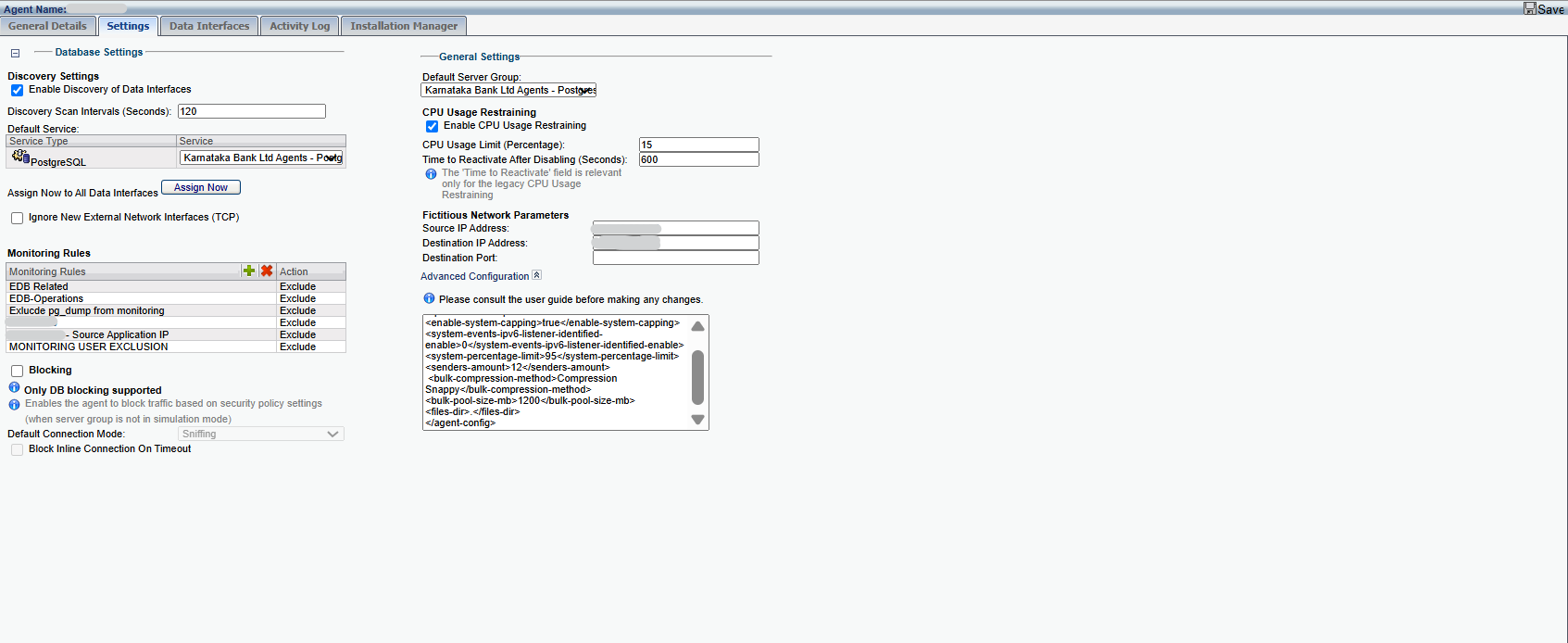
AMR Rules: We have already created and implemented AMR/exclusion rules for the agent to minimize unnecessary traffic. However, despite these changes, we have not observed any significant improvement, and the issue continues to occur intermittently.
Could you please review the above findings and advise if there are any additional checks, logs, or troubleshooting steps that we can perform? Any guidance or recommendations would be greatly appreciated, as we are trying to identify the root cause and reach a permanent resolution.
Thank you for your support.
------------------------------
Best Regards,
Bhuvan Shyam M
------------------------------
Original Message:
Sent: 07-04-2026 08:39
From: Revan Garlapati
Subject: Imperva DAM Agent "Agent Disk Quota Exceeded"
Here are a few reasons why the Agent Disk /agent warning appears during periods of high database traffic. check the below
1) Check the gateway status and connectivity during the alert period. If the connection to the gateway is lost, the Remote Agent creates PCAPs on the database server. When the limit is reached, no new data will be recorded. Once connectivity is restored, the Remote Agent sends the PCAPs to the gateway and resumes normal operations. After the PCAPs are sent, they are deleted from the database server.
3) if still the issue persistent, Create AMR rules to minimize unnecessary traffic by setting agent exclusion rules. This will prevent data that doesn't need to be monitored, such as replication traffic, backups, or disabled replication interfaces, etc , from being transmitted by the agent.
------------------------------
Revn
------------------------------